

Table of Contents
Selecting the right CRM can feel overwhelming because every platform promises simplicity, automation, and better sales results.
When you compare Zoho vs HubSpot, you are looking at two of the most trusted CRM systems used by thousands of startups, SMEs, agencies, and enterprise teams. Both are powerful in their own way, and each offers strengths that suit different types of organisations.
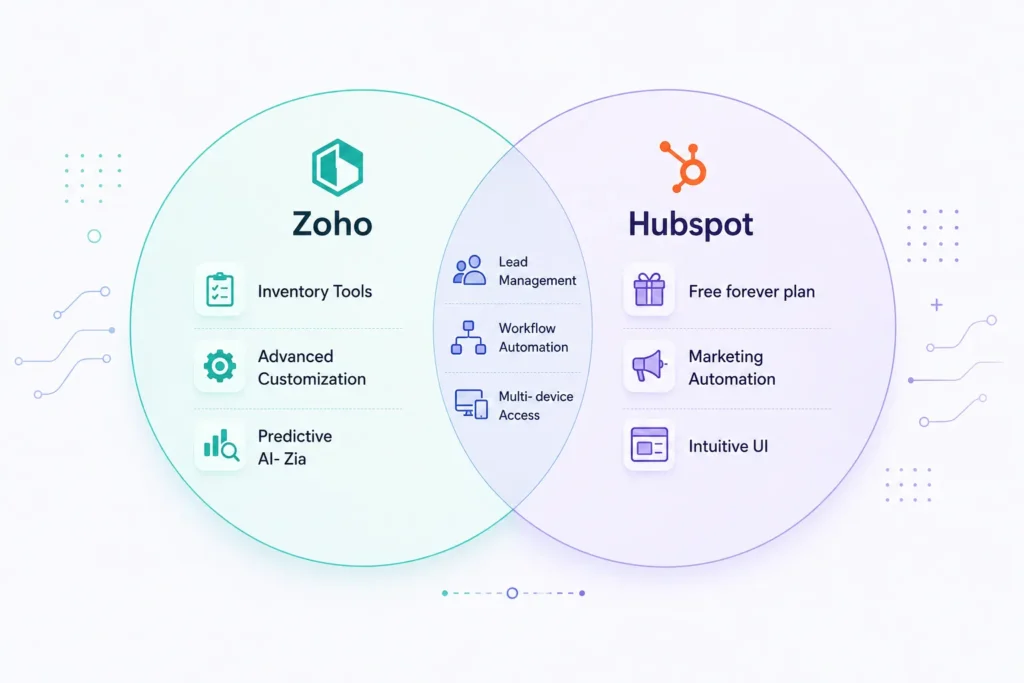
After years of hands-on experience working with both platforms across different industries, one thing becomes clear. Zoho and HubSpot approach CRM from two very distinct philosophies. Zoho focuses on deep customization and data-rich environments.
HubSpot emphasizes user experience, alignment with inbound marketing, and ease of adoption. Understanding these differences makes choosing between them far easier.
How Zoho and HubSpot Align on Core CRM Foundations
Zoho and HubSpot share several fundamental traits that make both platforms dependable options for managing sales, marketing, and customer relationships. They both offer unified ecosystems that let teams track leads, manage deals, and build better communication workflows.
Both platforms are also cloud-based and work smoothly on mobile devices, allowing teams to access data anytime and anywhere. They include AI-powered assistance that helps predict outcomes, recommend actions, and automate repetitive tasks.
They also integrate with popular tools such as Google Workspace, Slack, Outlook, and Zapier, ensuring a connected workflow.
Even though they share several similarities, their strengths shine in different areas, which is why this comparison exists—to help you decide which system matches your goals.
Free Trials and Getting Started
Zoho CRM provides a 15-day free trial that gives you access to a broad range of features. The initial trial phase is helpful when you want to explore customizations or test automation workflows quickly.
HubSpot CRM offers a free plan with no expiration date. The free tier supports contact management, email tracking, basic pipelines, and simple automation. For new businesses exploring CRM for the first time, HubSpot’s free plan is a painless way to start.
Understanding the Basics: What Both CRMs Do Well
At their core, Zoho CRM and HubSpot CRM support essential features such as lead tracking, deal stages, activity timelines, task automation, contact databases, and sales pipelines.
HubSpot leans into inbound marketing by naturally integrating forms, landing pages, and email automation. Zoho, in contrast, focuses on sales process customization, deeper segmentation, and data flexibility, which appeals to analytical teams.
1. Importing Files, Lists, and Leads
Both platforms support bulk imports, whether you are migrating from spreadsheets or older CRM systems. HubSpot guides you through the import process with simple wizards, making it easy even for beginners. Zoho allows deeper customization of field mapping and offers data cleanup options during import, which benefits teams handling complex or legacy data.
2. Zoho vs HubSpot: Quick Side-by-Side Snapshot
|
Feature |
Zoho CRM |
HubSpot CRM |
|
Free Plan |
15-day trial |
Free forever |
|
Starting Price |
$14/user/month |
$20/user/month |
|
Onboarding |
Moderate learning curve |
Very easy |
|
Marketing Automation |
Advanced with Zoho Marketing Hub |
Built-in and intuitive |
|
Customization |
Very deep |
Moderate |
|
AI Assistant |
Zia |
ChatSpot |
|
Inventory Management |
Included |
Requires integrations |
|
Dashboard Style |
Highly customizable |
Clean and modern |
|
Best For |
Data-heavy SMBs and enterprises |
Marketing-led teams and startups |
3. Ease of Onboarding and User Experience
HubSpot stands out for its simplicity. The interface feels welcoming the moment you sign up. Guided tours show you exactly where to click, and setting up your first pipeline takes only a few minutes. This makes HubSpot attractive for marketing teams, new businesses, and freelancers who want to get started quickly.
Zoho CRM takes a little more time to learn because of its flexibility. The setup wizard is detailed, and once customized, Zoho becomes incredibly powerful. Teams that want complete control over fields, segments, workflows, and analytics appreciate Zoho’s depth once they become familiar with it.
4. Managing Contacts and Leads
Both CRMs let you build rich contact profiles with communication history, email activity, tasks, and lead scoring. HubSpot integrates seamlessly with its marketing and sales hubs, making lead nurturing feel natural within the inbound workflow. Zoho takes a more granular, data-driven approach by letting you define custom fields, scoring rules, and segmentation layers that better align with your sales strategy.
5. Sales Process Automation
Automation is where both platforms shine, yet in different ways. HubSpot offers a visual workflow builder that makes creating automated sales paths intuitive and straightforward. Sales teams can design follow-ups, assign tasks, and trigger emails with minimal effort.
Zoho CRM offers rule-based workflows that let you automate every phase of the sales cycle, from lead assignment to deal progression. These automations can become very powerful because Zoho integrates deeply with its full suite of apps, including Zoho Books, Zoho Desk, and Zoho Campaigns.
6. Sales Funnels and Pipeline Management
Zoho supports multiple sales pipelines, each with customizable stages for each product or service category. This flexibility helps businesses with complex offerings or multi-team operations.
HubSpot uses a drag-and-drop deal board that feels natural and easy to update. For teams that manage a high volume of deals daily, HubSpot’s visual layout makes it easy to track and move opportunities.
7. Customization Depth
Zoho CRM stands out for customization. You can redesign modules, dashboards, and workflows almost entirely to fit internal processes. Companies with data-heavy operations or unique sales workflows benefit from this flexibility.
HubSpot also supports customization, but much of the deeper personalization is available only in higher-tier plans. For teams that need a straightforward CRM without technical complexity, HubSpot’s moderate customization options work well.
8. Dashboards and Analytics
HubSpot delivers beautiful, visual reports that help teams monitor marketing performance and track conversions. These dashboards are handy for inbound marketing teams that rely heavily on multi-channel analytics.
Zoho CRM offers more advanced filtering and data blending options through Zoho Analytics. The feature allows you to create cross-functional dashboards that combine data from marketing, sales, service, and finance.
9. AI Features and Automation Capabilities
Zoho’s Zia AI provides predictive deal scoring, workflow recommendations, anomaly detection, and task suggestions. These predictive insights help identify which deals deserve attention.
HubSpot’s ChatSpot uses conversational prompts to surface insights. It also supports AI-assisted writing for emails and content. Both AI systems help teams work smarter, but Zoho provides deeper predictive intelligence, while HubSpot focuses on speed and convenience.
10. AI & Automation Capabilities
|
AI/Automation Feature |
Zoho (Zia) |
HubSpot (ChatSpot) |
|
Predictive Lead Scoring |
✅ Yes |
✅ Yes |
|
Workflow Suggestions |
✅ Yes |
❌ No |
|
Email Writing Assistant |
✅ Yes |
✅ Yes |
|
Deal Forecasting |
✅ Yes |
✅ Yes |
|
Chat-Based Commands |
❌ No |
✅ Yes |
|
Anomaly Detection |
✅ Yes |
❌ No |
11. Marketing Automation Features
HubSpot is widely known for its marketing automation strength. Email sequences, landing page tracking, social media scheduling, and ad attribution are all built into the ecosystem. This automation readiness makes HubSpot an excellent choice for marketing-led teams.
Zoho Marketing Automation supports multichannel campaigns, segmentation, and lead nurturing. Teams that want centralized lead scoring and automated workflows across CRM and marketing systems can benefit from Zoho’s integrated approach.
12. Team Collaboration
Both platforms support shared pipelines, notes, and documents. HubSpot integrates smoothly with Slack, making team coordination easy. Zoho’s collaboration tools, such as Cliq and WorkDrive, provide internal teams with a unified workspace within the Zoho ecosystem.
13. Inventory Management
Zoho CRM includes inventory modules for managing quotes, invoices, product catalogs, and stock. This feature makes it particularly strong for product-based businesses. HubSpot relies on integrations for these features, which may require additional tools and subscriptions.
14. User Interface and Ease of Use
HubSpot offers a modern, clean interface that users appreciate. It feels fast and intuitive without extra clutter. Zoho’s interface is denser because it presents more data at once, appealing to users who prefer depth and control over simplicity.
15. Ease of Use & Implementation
|
Parameter |
Zoho CRM |
HubSpot CRM |
|
Setup Time |
1–2 weeks (depending on customization) |
1–3 days |
|
Onboarding Guides |
Extensive documentation |
Step-by-step onboarding wizard |
|
Integration Setup |
Manual mapping required |
Plug-and-play integrations |
|
Implementation Partner |
Often recommended for mid-large orgs |
Usually not needed |
|
Learning Curve |
Moderate |
Low |
16. Pricing Overview
HubSpot’s free plan is a significant advantage. Its paid plans start at around $20 per user per month, but costs climb quickly as you add marketing, sales, and service hubs. Zoho CRM begins at around $14 per user per month and remains reasonably priced across its tiers, making it a strong option for budget-conscious teams.
Final Verdict: Zoho vs HubSpot
Both Zoho CRM and HubSpot CRM stand out among the best CRM platforms available today, and each is powerful in its own way.
Choose HubSpot CRM for simplicity, fast onboarding, beautiful dashboards, and built-in marketing automation. It is especially popular with startups, freelancers, and marketing-driven teams.
Choose Zoho CRM if you want deep customization, extensive reporting, inventory management, and a cost-effective way to scale. It is ideal for SMEs, data-heavy organizations, and product-led businesses.
The best choice is the CRM that aligns with your team’s structure, your growth goals, and the level of customization you need.
If you want help selecting the right platform for your business, explore expert insights and tool recommendations on TheBestClicks.