

Table of Contents
In an AI‑driven search world, brands can’t afford to treat SEO as guesswork. Semrush acts as your always‑on co‑pilot, bringing together keyword research, competitor insights, technical audits, AI visibility, and content optimization in one unified platform.
Instead of juggling multiple tools and spreadsheets, you get a single workspace to discover high‑value keywords, analyze rivals, fix site issues, and create content that ranks and converts. Whether you’re a solo marketer, part of an in‑house team, or running an agency, Semrush helps you turn SEO data into clear, confident decisions.
What is Semrush and Why Does it Matter in 360° Marketing?
Semrush is an all‑in‑one digital marketing platform that helps brands grow and measure visibility across AI search, SEO, PPC, social media, content, and more. It brings keyword research, competitor intelligence, technical SEO, content optimization, and reporting into a single workspace, so teams do not have to jump between multiple tools.
In a 360‑degree marketing context, Semrush becomes the command center that connects organic search, paid campaigns, content, social, and market insights. Digital marketers, SEO specialists, agencies, and brands can use it to:
- Find profitable keywords and topics that their audience actually searches for
- Analyze competitors’ traffic, keywords, and backlinks to uncover growth opportunities
- Audit technical issues that quietly kill rankings and user experience
- Plan and optimize content that is ready for both SEO and AI search visibility
- Track rankings, AI visibility, and conversions in one place to prove ROI
Think of Semrush as a “co‑pilot” for your entire SEO journey, from the first keyword idea to long‑term performance tracking.
Explore The Tools Category: SEO Tools
Navigating the Semrush Interface: Top & Left Menus
When you log into Semrush, you primarily interact with two navigation areas:
- The top horizontal menu groups high‑level toolkits (Semrush 1, AI, Local, Content, Advertising, Traffic & Market, Social, etc.).
- The left‑hand sidebar lists detailed sections like SEO, AI, Traffic & Market, Local, Content, Social Media, Advertising, Reports, and more.
a) Top Menu: Toolkits at a Glance
Typical top‑level categories include:
- Semrush / Home – Your main dashboard (AI + SEO + traffic snapshot).
- AI / AI Visibility – Tools for tracking brand visibility and mentions across AI search platforms.
- SEO – Core SEO toolkit (keyword research, site audit, backlinks, on‑page optimization).
- Traffic & Market – Market intelligence, competitive traffic analytics, audience insights.
- Local – Local listing management, local rankings, and reviews for multi‑location brands.
- Content – Content ideation, optimization, SEO content templates, and AI‑assisted writing.
- Social – Social media scheduling, analytics, and listening tools.
- Advertising – PPC research, display, and PLA analysis, and competitor ad copy insights.
- Reports – Base and Pro reports, automated client‑ready PDFs with dashboards.
You can think of each top menu item as a “toolkit” that bundles several related tools, so you can buy or focus on exactly what you need (only SEO, or SEO + Traffic & Market, etc.).
b) Left‑Hand Sidebar: Deep‑Dive into Each Toolkit
In a toolkit like SEO, the left sidebar expands to display a list of individual tools and reports. Typical categories you will see include:
- Dashboard / Projects – Overview and project‑level view
- Keyword Research – Keyword Overview, Keyword Magic Tool, Keyword Gap
- Competitive Research – Domain Overview, Organic Research, Keyword/Backlink Gap
- On‑Page & Technical SEO – Site Audit, On-Page SEO, Log File Analyzer
- Backlink Tools – Backlink Analytics, Backlink Audit, Link Building
- Rank Tracking – Position Tracking, Sensor, Visibility metrics
- Content Tools – Topic Research, SEO Content Template, SEO Writing Assistant
- Local, Social, Advertising, Reports – Sub‑menus under their respective toolkits
Visually, you can imagine the top menu as the “big rooms” in a house (SEO, Content, Local, etc.) and the left sidebar as the furniture within each room (keyword tools, audit tools, etc.)
Setting Up Your Semrush Command Center
Your first practical step is to create a Project and launch your SEO Dashboard, which Semrush calls your “command center.”
Creating a Project and Dashboard
- From the home screen, enter your website domain and click Start now.
- Semrush automatically creates a Project and loads an SEO Dashboard.
- This dashboard shows key metrics like AI Visibility, organic traffic, site health, and rankings, each linking to deeper reports.
You will see clickable metrics such as:
- AI Visibility metric – How often your brand appears in AI‑generated answers across supported platforms.
- Organic traffic – Estimated SEO traffic over time.
- Site Health score – Overall technical SEO score based on Site Audit results.
- Tracked keywords – Number of keywords in Position Tracking and their visibility percentage.
Connecting Analytics and Search Console
To make this a true 360° hub, connect:
- Google Analytics for user, session, and engagement metrics.
- Google Search Console for actual search queries, impressions, and clicks.
This interconnectivity turns Semrush into a single “cockpit” where you can correlate keyword movements, AI visibility, technical issues, and real traffic/engagement.
Real‑Life Example: E‑commerce Brand’s SEO Command Center
A mid‑size fashion e‑commerce brand creates a project (for example, fashion.com) and connects Google Analytics and Search Console. Every Monday, the SEO lead opens the Semrush dashboard to check:
- AI Visibility score to see if their buying guides are being cited in AI answers.
- Organic traffic trend vs last month.
- Site Health score from Site Audit.
If Site Health drops below 85, they prioritize technical fixes that week. This keeps technical SEO, traffic, and AI presence aligned without logging into multiple tools.
Explore Our Tool Comparison: Semrush vs Moz Pro: The Ultimate Guide
1. Keyword Research with Semrush: Finding What Your Audience Wants
Keyword research is the starting point for SEO, content planning, and even PPC campaigns. Semrush offers two main tools here: Keyword Overview and Keyword Magic Tool.
Keyword Overview: Quick Snapshot of a Query
Use Keyword Overview to evaluate any keyword’s potential:
You’ll see:
- Search volume – Average monthly searches.
- Keyword difficulty (KD%) – How hard it is to rank organically.
- Search intent: informational, navigational, transactional, or commercial.
- CPC (cost‑per‑click) – Useful for gauging commercial value.
- SERP features & top pages – Types of results currently ranking.
In practice, this tells you:
- How much traffic might a keyword bring?
- How competitive is it?
- What type of content is winning? (blog post, product page, comparison, etc.)
Real‑Life Example: Choosing the Right “Primary” Keyword
A SaaS startup is planning a landing page for its team collaboration tool. They compare three keywords in Keyword Overview:
- “team collaboration tool”
- “remote team software”
- “online collaboration platform”
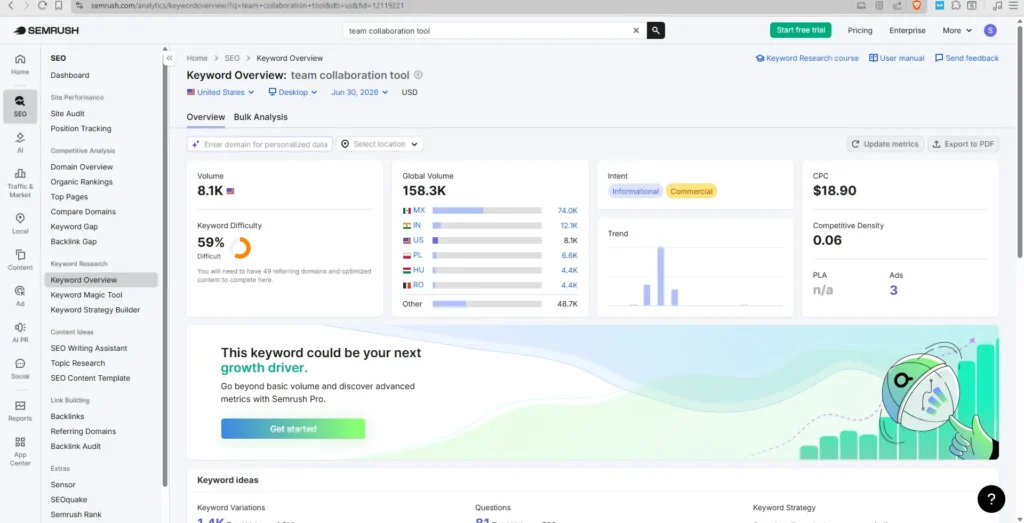
They notice “team collaboration tool” has solid volume, medium difficulty, and a commercial intent label. They choose it as the primary keyword for the main landing page and use the others as secondary keywords, aligning copy, headings, and meta tags accordingly.
a) Keyword Magic Tool: Discovering Long‑Tail Gold
Once you analyze a seed keyword, open Keyword Magic Tool to expand your list.
You can:
- Generate thousands of related keywords from a single seed.
- Filter by keyword difficulty, search volume, intent, questions, etc.
- Group keywords into topic clusters using the left‑side categories.
For beginners and intermediates, a practical approach is:
- Focus on low‑competition keywords (KD% under ~50) that are still relevant.
- Prefer commercial or transactional intent terms for lead‑driving pages.
- Start with 5–10 high‑value target keywords for your first content and optimization wave.
For example, a coffee equipment brand might discover “coffee vending machine” with solid volume and manageable difficulty, making it an excellent target topic.
Real‑Life Example: Finding Long‑Tail Keywords for a Blog Series
A nutrition coach wants to attract clients interested in plant‑based diets. Starting with the seed keyword “plant-based diet”, they:
- Use the Keyword Magic Tool to filter by Questions and KD% < 50.
- Find ideas like “plant-based diet for beginners”, “plant-based diet meal plan on a budget”, and “plant-based diet for weight loss women”.
They turn each into a blog post and internally link them to a main cornerstone guide on “Plant‑Based Diet for Beginners”, improving topical authority and organic visibility.
Competitor Analysis: Learning from the Winners
Semrush shines at reverse‑engineering competitor strategies. Digital marketers and agencies can use this for pitch decks, content plans, and gap analyses.
2. Domain Overview: High‑Level Competitor Snapshot
Enter any competitor domain into Domain Overview to see:
- AI Visibility – How strong they are in AI‑generated results.
- Organic traffic – Estimated monthly SEO visits.
- Paid traffic – Estimated Google Ads traffic.
- Authority Score – Overall domain strength based on traffic and backlink quality.
- Backlink profile – Number of referring domains and links.
- Top countries & pages – Where their traffic comes from and which pages lead.
This overview instantly shows traffic gaps. If a competitor gets 3x your organic visits, that gap becomes a strategic target.
Real‑Life Example: Benchmarking Against a Stronger Competitor
A local accounting firm compares its site to a national accounting brand. In Domain Overview, they see the competitor has:
- Much higher organic traffic
- Stronger Authority Score
- Most traffic comes from the tax guide content
They realize they have almost no informational content, only service pages. They decide to build a “tax tips and small business finance” hub to close the gap over time rather than compete directly on branded terms.
Also Read: SEO Tools for Small Businesses
3. Organic Research and Keyword Gap
From Domain Overview, you can dive deeper using:
- Organic Research → Positions – All the keywords a site ranks for, with positions and SERP features.
- Position Changes – Which queries are they gaining or losing?
- Top Pages / Top Page Changes – Content that drives the most traffic or is trending.
Real‑Life Example: Discovering High‑Value Competitor Keywords
A skincare D2C brand uses Organic Research on a competitor. They:
- Sort by Top pages to see which competitor blog posts bring the most traffic.
- Notice a “best moisturizer for oily skin” article with high traffic.
- Check the rankings and see that the competitor sits in the top 3.
They create a better, more comprehensive, medically reviewed guide targeting the same keyword and related variations, then optimize images, schema, and internal links. Over a few months, they move into the top 5 and capture some of that traffic.
Then use Keyword Gap to compare your domain with up to four competitors.
You can identify:
- Missing keywords – They rank, you don’t (prime content ideas).
- Weak keywords – You rank lower than competitors.
- Shared keywords – Where you currently compete head‑to‑head.
These insights are especially powerful for content roadmaps: build articles or landing pages around “missing” keywords to reclaim traffic.
Real‑Life Example: Building a Gap‑Driven Content Calendar
A B2B cybersecurity company compares its domain with three main competitors in Keyword Gap. The report shows:
- Dozens of “missing” keywords around “zero trust security” and “endpoint detection”.
- Several “weak” keywords where they rank on page 2, while competitors are on page 1.
They plan a 3‑month content calendar focusing first on missing keywords (new in‑depth pages), then schedule optimizations for weak pages (refreshing content, adding FAQs, improving internal links) to climb into the top 10.
4. Site Audit & Technical SEO: Fixing Hidden Issues
Even great content can underperform if technical issues prevent search engines from indexing it. Semrush’s Site Audit and related tools expose and prioritize these problems.
Running a Site Audit
From your Project:
- Click Site Audit, then choose crawl settings (the defaults work for most).
- Start the audit and wait for Semrush to crawl your pages.
- Review your Site Health score and Errors, Warnings, and Notices.
Common issues include:
- Broken internal links
- Slow‑loading pages
- Duplicate content and thin pages
- Missing meta tags, hreflang, or HTTPS problems
Each issue type comes with explanations and recommended fixes, making it beginner‑friendly but still robust enough for technical SEOs.
Real‑Life Example: Fixing Issues That Block Rankings
A travel blog with 2,000+ posts runs a Site Audit and finds:
- Hundreds of broken internal links
- Many pages have duplicate title tags
- Slow Core Web Vitals on image‑heavy posts
They prioritize:
- Fixing broken links to reduce crawl waste and improve UX.
- Updating duplicate titles with unique keyword‑rich titles.
- Compressing images and enabling lazy loading on top‑traffic posts.
Within a few weeks, their Site Health score improves, and they start seeing better stability in rankings across key posts.
5. Backlink Audit & Link Health
The Backlink Audit tool analyzes backlink quality using over 50 parameters.
You can:
- Group referring domains by link type, category, or Authority Score.
- Identify suspicious or toxic links that may harm rankings.
- Add links to a disavow list, then export it to Google’s Disavow Tool.
- Track new, broken, and lost backlinks via alerts.
Used alongside Backlink Analytics and Link Building Tool, this supports both defensive and proactive link strategies.
Real‑Life Example: Cleaning Up a Risky Backlink Profile
An online casino affiliate site notices a drop in rankings and uses Backlink Audit. They find a cluster of spammy links from unrelated international domains. They:
- Tag these domains as toxic.
- Add them to the disavow list and upload to Google.
- Simultaneously, focus outreach on getting authoritative links from relevant gambling news sites and forums.
This combination of cleaning and building helps stabilize their rankings and reduces the risk of further penalties.
Real‑Life Example: Reverse‑Engineering Competitor Links
A B2B SaaS brand checks a competitor in Backlink Analytics and sees that most of their strong links come from:
- Industry blogs
- Podcast show notes
- Software comparison sites
The brand filters to referring domains with a high Authority Score and exports them into the Link Building Tool. They then run a targeted outreach campaign to pitch guest posts, product comparisons, and podcast appearances on those same sites, aiming to replicate the competitor’s backlink profile.
Explore Our Success Story: How Bloomvera Retail Grew Sustainably
6. On‑Page Optimization and Content Planning
Once you have keywords and a healthy site, you need to optimize individual pages. Semrush offers on‑page SEO tools plus a full content toolkit.
On-Page SEO Tool: Page‑Level Recommendations
From the Project dashboard, set up the On-Page SEO Tool for the target URLs and keywords.
You’ll receive prioritized suggestions grouped into:
- Strategy – Improve titles, meta descriptions, and targeting.
- Content – Adjust word count, semantics, and readability.
- User experience – Improve mobile friendliness and page speed.
- Technical – Schema markup, HTTPS, indexing hints.
- Backlinks – Suggestions for external authority signals.
These to-the-point recommendations make it easier for beginners and intermediates to know exactly what to fix first on key pages.
Real‑Life Example: Improving a Struggling Service Page
A home renovation company has a “kitchen remodeling” service page stuck on page 2 of Google’s search results. Using the On Page SEO Tool, they see recommendations like:
- Add the primary keyword in H1 and improve the meta description.
- Expand content to answer more common questions (timeline, cost, materials).
- Add internal links from blog posts about kitchen trends.
They implement the changes and monitor Position Tracking. Over the next month, the page moves from positions 14–16 into the top 7 for their main city.
7. Content Toolkit: From Ideas to Optimized Articles
Within the Content toolkit, you typically find tools such as:
- Topic Research – Discover subtopics, questions, and headlines around a seed topic.
- SEO Content Template – Recommended semantically related words, length, and readability based on top SERP competitors.
- SEO Writing Assistant (SWA) – Real‑time content scoring (SEO, readability, originality, tone of voice) as you write in Google Docs or the SWA editor.
For brands and agencies, this enables:
- Consistent tone of voice across multiple writers.
- Content briefs that align with SEO best practices.
- Scalable production without sacrificing quality.
Real‑Life Example: Building a Topic Cluster Around “Remote Work”.
An HR software company wants a content hub focused on “remote work policies”. Topic Research shows subtopics like:
- “remote work best practices for managers”
- “legal requirements for remote employees”
- “hybrid work guidelines”
They create a pillar article, “The Complete Remote Work Policy Guide,” and several cluster posts covering each subtopic. Each cluster post links back to the pillar page and vice versa, sending strong topical signals to search engines.
8. SEO Content Template
Real‑Life Example: Creating a Brief for a Freelance Writer
A marketing manager needs an SEO‑friendly article on “How to start a podcast”, using the SEO Content Template, they get suggested:
- Semantically related keywords
- Recommended text length
- Suggested readability level
- Competitor examples to benchmark
They sent this template as a brief to a freelance writer. The writer delivers an article that’s aligned with SERP expectations and requires minimal SEO rework.
9. SEO Writing Assistant
Real‑Life Example: Live Optimization in Google Docs
A health brand’s content writer drafts an article in Google Docs on “intermittent fasting for beginners,” with the SEO Writing Assistant enabled. They:
- See suggestions to naturally add related terms, such as “fasting window” and “eating window”.
- Adjust sections where readability is too complex.
- Check that the tone remains friendly and trustworthy, not overly technical.
The final article is aligned with SEO recommendations and brand voice, reducing editing cycles.
10. Rank Tracking and Reporting: Proving Impact
Tracking rankings and visibility is critical for long‑term SEO and client reporting. Semrush bundles this in Position Tracking and Reports.
Position Tracking: Daily Rank Monitoring
Set up Position Tracking by:
- Choosing your domain and target location(s).
- Entering your target keywords (manually or from a list).
- Letting Semrush track daily positions and calculate a Visibility %.
You can see:
- Overall visibility score across tracked keywords.
- Daily position changes (wins and losses).
- Estimated traffic based on rankings.
- New competitors are entering the SERPs for your keywords.
For agencies, this is ideal to show clients how SEO investments translate into visible SERP improvements over time.
Real‑Life Example: Monitoring a Product Launch Campaign
A new D2C mattress brand launches a campaign around “a cooling mattress for hot sleepers”. They add 50 related keywords to Position Tracking and monitor:
- Overall visibility for these terms in their target country.
- Daily movements of their main product page.
- New competitors are entering the SERPs.
As they publish more content and build links, they track visibility rising from 2% to 15%. This helps them prove that their content and PR efforts are actually moving rankings.
11. Reporting: Base vs Pro Reports
Under Reports, you can:
- Use templates or build custom PDF reports.
- Drag‑and‑drop widgets for keyword rankings, AI visibility, backlinks, traffic, and site health.
- Schedule automated email delivery to stakeholders (weekly, monthly, etc.).
Semrush distinguishes base reports (included with plans) from more advanced Pro reports, which offer additional customization and data options.
Real‑Life Example: Monthly Client SEO Report
An SEO agency preparing a monthly report for a fashion retailer uses Semrush reports to:
- Pull Position Tracking charts for key keywords.
- Add Site Audit health trend over three months.
- Insert a widget for organic traffic estimates and top pages.
They schedule this report to be sent automatically on the 1st of every month. In the meeting, they use the report to highlight wins (new top‑3 keywords) and align on next month’s priorities (fixing crawl issues and building links).
12. AI & AI Visibility: Preparing for the New Search Landscape
AI‑driven search experiences (AI Overviews, chat‑based answers, etc.) are changing how people discover brands. Semrush’s AI Visibility Toolkit helps you understand and improve how often your brand appears in AI answers.
Key metrics include:
- AI Visibility score (0–100): Overall presence on AI platforms.
- Mentions – How often your brand appears.
- Cited pages – URLs used as sources in AI responses.
These parameters allow you to:
- Benchmark your AI presence against competitors.
- Identify content that AI models already trust and amplify.
- Plan content designed for citation by AI tools.
For marketers in 2026 and beyond, this bridges classic SEO with AI‑search optimization.
Real‑Life Example: Optimizing for AI Overviews
A financial education site tracks AI Visibility for its brand and key pages. They notice AI tools often cite their “mortgage calculator” page but rarely their “first‑time homebuyer guide”. To improve AI visibility for the guide, they:
- Update the content with clearer definitions and structured sections.
- Add FAQs marked up with schema.
- Build a few authoritative backlinks to the guide from finance blogs.
Over time, they see more AI citations for this guide, sending additional traffic and brand exposure beyond classic SERPs.
13. Traffic & Market: Understanding Your Niche and Audience
The Traffic & Market toolkit gives deeper competitive intelligence beyond basic SEO.
You can:
- Analyze traffic sources and channels (organic, paid, direct, referral, social) across any domain.
- Discover new competitors and niche leaders you might not have known about.
- Understand audience overlaps and interests for better targeting.
These insights are especially useful for:
- Positioning a brand within a crowded space.
- Planning multi‑channel campaigns (SEO + PPC + social).
- Market research for new product launches or geographies.
Real‑Life Example: Identifying a Growth Market
A D2C supplement brand uses Traffic & Market tools to analyze competitors and sees that:
- A major share of competitor traffic comes from a country they haven’t targeted yet.
- Competitor traffic in that country is heavily driven by blog content, not just product pages.
They decide to launch localized content and landing pages for that market, targeting similar keywords. This allows them to enter a proven, high‑intent market with less guesswork.
14. Local Toolkit: Winning in Maps and Nearby Searches
For local businesses or multi‑location brands, the Local toolkit centralizes local SEO activities.
Typical capabilities include:
- Listing management – Synchronize business data across major directories and platforms.
- Local keyword and rank tracking – See how you rank in specific cities or zip codes.
- Review monitoring – Track and manage online reviews.
Local SEO is crucial for driving foot traffic and calls, and Semrush makes it manageable at scale (especially for agencies handling many locations).
Real‑Life Example: Improving Visibility for a Multi‑Location Clinic
A chain of physiotherapy clinics uses the Local toolkit to manage listings across cities. They:
- Ensure consistent NAP (name, address, phone) on all directories.
- Track local rank positions for “physiotherapist near me” around each clinic.
- Identify locations with weak rankings and encourage patients to leave more reviews there.
Within a quarter, poorly performing locations see improved map pack visibility and more appointment calls.
15. Social & Advertising: Beyond Organic SEO
Semrush doesn’t stop at SEO. It also supports social media and paid advertising, giving you a full-funnel view.
a) Social Toolkit
The Social toolkit usually includes:
- Social media scheduling across platforms.
- Performance analytics and engagement metrics.
- Brand monitoring and listening to track mentions.
Marketers can use this to distribute SEO‑driven content more effectively and amplify brand visibility on social channels.
Real‑Life Example: Boosting SEO Content with Social Promotion
A marketing team publishes a new long‑form guide on “B2B lead generation strategies“. Using the Social toolkit, they:
- Schedule a week‑long promotion across LinkedIn, X (Twitter), and Facebook.
- Track engagement rates and click‑through to the guide.
- Use the best‑performing social copy as inspiration for meta descriptions and email subject lines.
The coordinated push brings initial traffic, which can help with faster indexing and user engagement signals for that content.
b) Advertising Toolkit
The Advertising toolkit focuses on:
- Competitor PPC research (keywords, ads, budgets).
- Display and PLA insights.
- Ad copy and landing page ideas.
Using SEO and Advertising data together lets you:
- Identify which keywords to target via organic, paid, or both channels.
- Spot profitable PPC terms that could also be strong SEO targets.
Real‑Life Example: Using PPC Data to Guide SEO
An online course creator runs Google Ads for “copywriting course online”. Using the Advertising toolkit, they see:
- Which ad keywords deliver the best conversion rates?
- Which competitor ads appear frequently, and what messages do they use?
They then:
- Create SEO content targeting the highest‑converting PPC keywords.
- Align organic page messaging with high‑performing ad angles (e.g., “learn in 30 days”, “portfolio‑ready assignments”).
This way, PPC results directly inform long‑term SEO priorities.
16. End‑to‑End Workflow Example
Real‑Life Example: 3‑Month SEO Sprint with Semrush
A B2B software company runs a 3‑month SEO sprint using Semrush:
- Week 1–2: Run Site Audit, fix major technical issues, and set up Position Tracking.
- Week 3–4: Use Keyword Overview and Keyword Magic Tool to select target keywords and map them to pages.
- Month 2: Build a topic cluster using Topic Research + the SEO Content Template, write using the SEO Writing Assistant, and publish.
- Month 3: Conduct competitor analysis and a Keyword Gap analysis to spot remaining opportunities, begin link outreach via Backlink Analytics and Link Building, and monitor movement in Position Tracking.
At the end of three months, they use Reports to show management improvements in visibility, new top‑10 rankings, and early traffic lifts, making the case for continued investment.
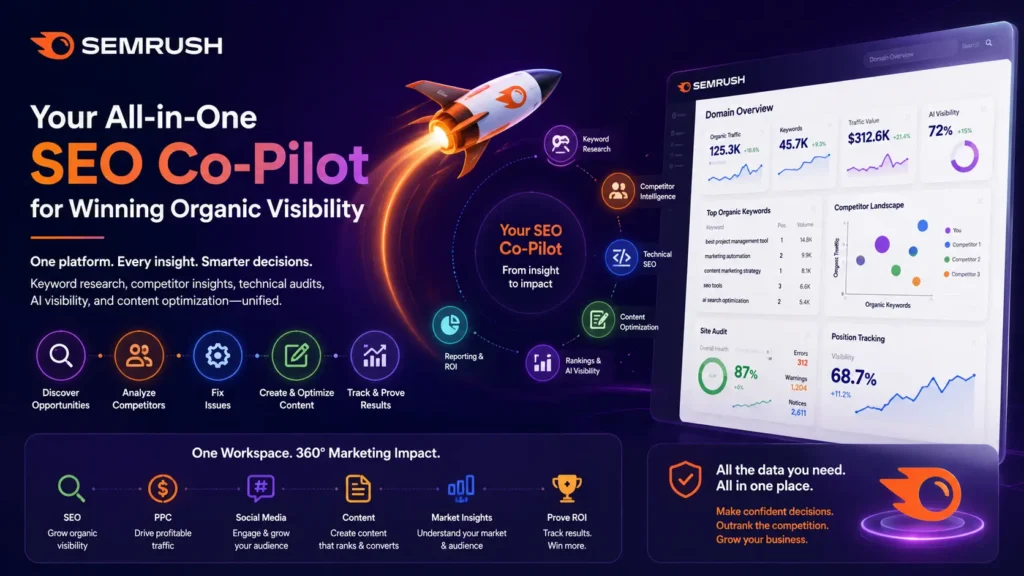
Putting It All Together: Semrush in a 360° SEO Workflow
For beginners and intermediate SEO professionals, here’s a simple way to use Semrush end‑to‑end:
- Create your Project and dashboard for a centralized view.
- Run a Site Audit to fix critical technical issues.
- Do keyword research with Keyword Overview and Keyword Magic Tool, focusing on 5–10 high‑value terms.
- Analyze competitors via Domain Overview and Keyword Gap to refine your target list.
- Plan and create content using Topic Research, SEO Content Template, and SEO Writing Assistant.
- Optimize existing pages using the On-Page SEO Tool recommendations.
- Track rankings and AI visibility with Position Tracking and AI Visibility Toolkit.
- Automate reporting to keep stakeholders aligned and prove ROI.
Over time, add Traffic & Market, Local, Social, and Advertising as you expand into full‑funnel campaigns.
Make Semrush Your Primary SEO Partner
For brands serious about organic visibility, Semrush is not just another SEO tool—it’s a unified ecosystem that:
- Combines AI‑era visibility tracking with classic SEO fundamentals.
- Turns competitor data into actionable keyword and content strategies.
- Automates repetitive SEO tasks so you can focus on strategy and content.
- Helps agencies deliver clear, impressive reports that win and retain clients.
Whether you are just starting out or already running campaigns, making Semrush your primary SEO platform gives you a consistent, data‑driven way to grow traffic, leads, and conversions over the long term.
If you haven’t already, set up your first Project, run a Site Audit, and discover 5–10 new keyword opportunities today—then keep Semrush open in your browser as your everyday SEO co‑pilot.
Frequently Asked Questions
Is Semrush suitable for complete beginners?
Yes. Semrush offers guided dashboards, tooltips, and beginner‑friendly defaults, plus Semrush Academy courses and onboarding checklists to help you learn step by step.
How soon can I see SEO results using Semrush?
Most websites start seeing meaningful improvements in rankings and traffic within 60–90 days, assuming consistent implementation of technical fixes, content creation, and optimization suggested by the tools.
Can Semrush help with both on‑page and off‑page SEO?
Yes. On‑page SEO is covered by Site Audit, On-page SEO Tool, and content tools, while Backlink Analytics, Backlink Audit, and Link Building Tool support off‑page SEO.
Does Semrush offer a free version?
Semrush provides a free plan with limited access (such as a small number of keyword searches and pages crawled), plus time‑limited trials of paid plans with higher limits for projects, audits, and keywords.
How does Semrush differ from other SEO tools?
Semrush differentiates itself by combining SEO, AI visibility, content, social, advertising, and market intelligence into a single integrated platform with robust competitor analysis and reporting, reducing the need for multiple tools.