
Table of Contents
Hey designers, the Figma vs Adobe XD debate never dies, and for good reason. Both are powerhouse UI design tools, but which one fits your workflow? Whether you are freelancing solo, running a remote team, or handing off prototypes to developers, this comparison offers practical insights to help you feel assured in choosing the right tool in 2026.
Understanding why Figma vs Adobe XD remains relevant in 2026 helps you anticipate future updates and choose a tool aligned with upcoming workflows.
Adobe XD launched in 2016 as a competitor to Sketch, featuring smooth animations. Figma arrived as the browser-based disruptor, making real-time collaboration a reality. By 2026, Figma will dominate with Dev Mode and AI features, while XD remains strong in Adobe ecosystems, though its standalone availability has shifted toward Creative Cloud bundles.
The choice boils down to your needs: live co-editing or seamless Adobe integrations? Let’s break it down feature by feature.
Explore The Tool Category: Best Graphic Design Tools
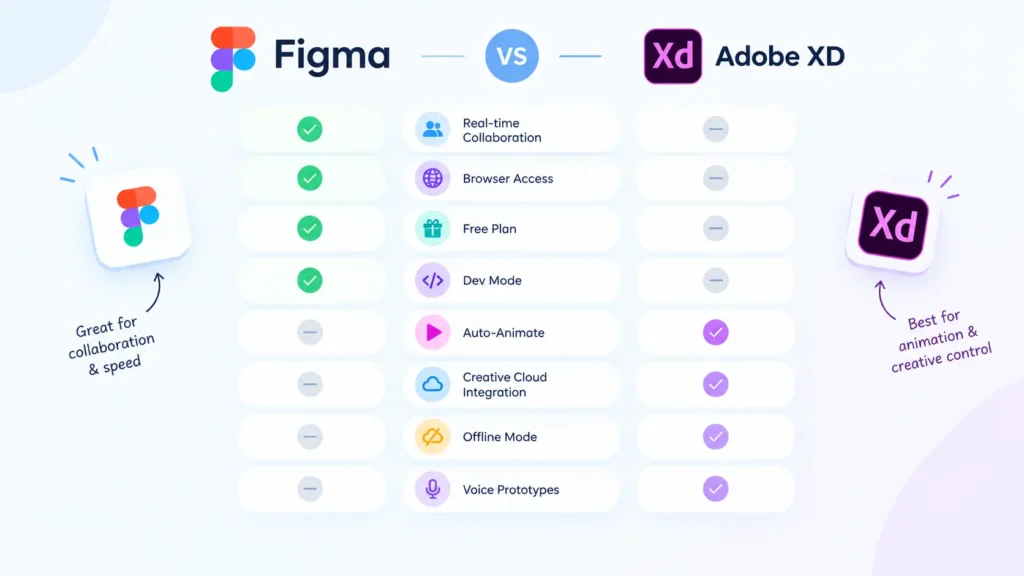
Head-to-Head: Figma vs Adobe XD Comparison Table
Collaboration: Figma Takes the Lead
Imagine your marketer jumping into the prototype mid-flow, tweaking copy while you adjust frames. Figma makes this possible with multiplayer editing, cursor tracking, and threaded comments right in the file. Version history lets you revert changes instantly.
Adobe XD offers robust share links with customizable views (comments-only, specs, or presentation mode) and real-time co-editing via Creative Cloud. It works well for structured agency feedback, which helps you feel confident your workflow is supported, though it feels more sequential than Figma’s live hub.
Actionable Tip: For async teams, Figma’s file-level access beats re-inviting per project. Agencies, use XD’s multiple share links to control stakeholder views without overexposure.
Prototyping and Interactions Breakdown
Figma’s Smart Animate handles overlays and component states smoothly, with real-time team testing. Add notes or even Loom videos directly to elements.
XD pushes further with voice commands, timed transitions, component states for hovers/toggles, and 3D transforms for depth. Repeat Grids speed up pattern duplication, like list views.
Build a checkout flow in both: Figma shines for responsive, multi-device prototypes, giving you confidence in your design’s flexibility; XD’s Auto-Animate creates smooth microinteractions, helping you trust your prototypes’ quality. Test user flows early to support your project effectively.
Design Tools: Vectors, Layouts, and Typography
Figma’s vector networks let you edit any point on a path without using boolean operations, making them perfect for custom icons. Auto Layout controls padding, spacing, and stacking for true responsive components, like buttons that expand with text. [page:designlab][page:zerotomastery]
XD’s pen tool and boolean ops work fine, with Repeat Grids for scalable patterns. Responsive Resize uses anchors (pin left/top, etc.) but requires more manual setup. Typography? Both save styles (Figma Text Styles, XD Character Styles) that update globally. XD pulls Adobe Fonts seamlessly.
Pro Tip: Designing a dashboard? Figma’s grids (square, columns, rows) plus constraints make resizing effortless. XD suits importing Illustrator vectors.
Figma runs browser-first (macOS/Windows/Linux), with offline desktop apps. Jump in from any device, even mobile, for reviews. XD is desktop-only (Windows 10+ and macOS), offline-first, but cloud sync is required for collab.
Large files? XD handles them snappier solo. Figma’s cloud scales via plugins but lags on spotty WiFi.
Freelancer Hack: Figma’s no-install means client-site edits on the fly. XD for deep offline work.
Plugins, Integrations, and Design Systems
Figma‘s 100k+ plugins cover icons, animations, and accessibility checks. Build team libraries for colors/effects shared across files.
XD‘s growing plugin ecosystem ties to Adobe (Photoshop libraries sync assets). Linked Assets update across XD files. [page:designlab]
Insight: Figma for extensible workflows (add AI layout tools); XD for Adobe natives reusing Photoshop styles. [page:zerotomastery]
Dev Handoff and Export
Figma‘s Dev Mode shows CSS/Swift/Android specs, assets, and auto-layout rules in a single file. A single source of truth cuts meetings.
XD generates browser-inspect links for CSS and assets, but not for native Swift/Android. Strong for Adobe devs. [page:zerotomastery]
Tip: Export XD to SVG/PDF for Figma import via plugins. Hybrid teams: XD assets into Figma prototypes.
Pricing Reality Check
Figma: Free for starters (limited projects), $12/user/mo Pro.
XD: Creative Cloud only ($59.99/mo annual, $89.99 monthly). No XD standalone.
Budget Advice: Solo? Figma free tier lasts. Adobe Suite users? XD’s bundled value.
Which Tool Fits Your Workflow?
Let’s analyze which graphic design tool may enhance workflow for various graphic design entities:
Freelancers and digital marketers
Figma’s free tier and effortless client sharing make it perfect for solo creators juggling multiple projects. Share live prototypes instantly without version confusion or extra costs.
Adobe agencies
XD integrates seamlessly with Photoshop and Illustrator, streamlining workflows for teams already in the Creative Cloud ecosystem. Its advanced animations and asset syncing save hours on polished deliverables.
Startups and distributed teams
Figma eliminates silos through real-time multiplayer editing and unlimited guest access for stakeholders. Remote teams stay aligned without endless email chains or file merges.
One-person shops and indie developers
Figma bridges mockups to code with Dev Mode’s CSS exports and inspect tools right in the design file. Solo creators prototype, test, and hand off to themselves without switching apps.
The Verdict: Choose What Powers Your Designs
Both elevate UI design. Figma leads collaborative, browser-flexible teams. XD excels in Adobe Flows and high-fidelity interactions. Run free trials; your projects decide. Make no wrong choice, just the right fit.
At TheBestClicks, discover the best graphic design tools, including Canva and Visme.
Exclusive deals help you prototype smarter.
Start with Figma Free: Prototype collaboratively today – no credit card needed!
Try Adobe XD Now: Seamless Creative Cloud integration for pro animations.
Frequently Asked Questions
Is Figma easier for UI design beginners?
Yes, Figma’s intuitive Auto Layout and generous free plan make it far more accessible for newcomers compared to XD’s steeper Adobe learning curve. Beginners can start prototyping immediately without complup or subscriptions.
Can I import Adobe XD files into Figma?
Direct import isn’t supported, so export your XD designs as SVG or PDF files first. Then recreate them in Figma, using plugins like Codia AI to streamline the process and preserve most layers and styling.
Which handles large projects better?
Adobe XD performs better with large files and offline work, maintaining speed without an internet connection. Figma excels with 2026 cloud optimizations for distributed teams, but may lag on weak connections with complex designs.
Should agencies migrate from XD to Figma?
Migrate if real-time collaboration outweighs your Adobe ecosystem integration needs, as Figma dramatically transforms team workflows. Many agencies successfully run hybrid setups, using XD assets within Figma prototypes for the best of both worlds.
Figma vs XD for design systems?
Figma keeps everything in-app with powerful team libraries and global styles that update across files seamlessly. XD leverages Creative Cloud Libraries for syncing assets across Photoshop, Illustrator, and other Adobe tools effortlessly.